

Class 15
- dejamichele
- Oct 28, 2022
- 3 min read
Updated: Oct 30, 2022
October 30th, 2022
Major Updates:
I went back to my old camera tracks and adjusted the doors so they were on the ground plane. (Doors were re-positioned and may need more adjustment)
I did a new camera track for door 7
Got projections working behind the proxy doors so parallax should be accurate
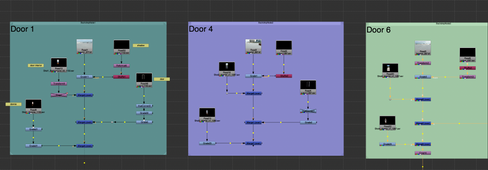
This is what my node graph looks like for the final comps. First photo is for shots 1, 2, and 4 (individual doors). Second photo is for shots 3 and 5 (moving in circle).



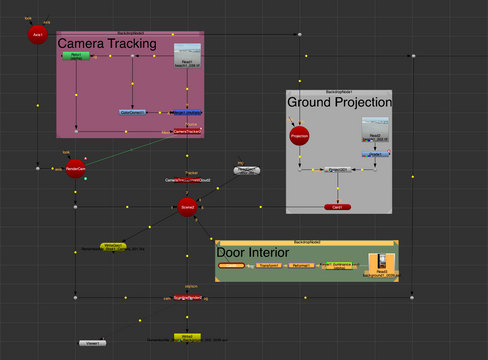
This is my node graph with the working projection. I render the door interior and Donnie individually so I can color correct them individually later.


October 29th, 2022
So... I may have figured out the ongoing issue. I have been wondering for weeks why the first tracks I did looked so much better with the checkerboard cube in Nuke than it did when the door was rendered out of Mantra and brought back.
Checkerboard doors (class 3)
Rendered doors (class 11) (Skip to 1:47)
I was tying to get a good track out of shot 2 today and realized that the cube I put into the scene was in the middle of the point cloud on the y axis. It was just in the middle of the ground. When I put it more on top of it, it didn't slip as much. So, I went back to my original tracking file and looked at the 3D view. I had originally positioned the door exactly where the checkerboard cubes were, but repositioned them later to be smaller in the scene. I did not go about this the right way because they are no longer sitting on the ground.
Shot 1 Shot 2 Shot 4

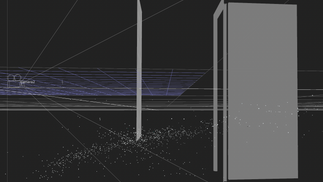


Between these 3 shots with the checkerboard box, shot 2 slipped the most. Now I know it was because the original placement for the box wasn't on the ground. With adjustments, I may be able to use my original cameras for the renders!
Here is shot 2 with the checkerboard box and the door geo fixed to sit on top of the ground.
October 28th, 2022
I've got the door and shadow rendered from Houdini and it doesn't quit work like I thought it would. For some reason the door bounces a little as the camera moves away. I don't really understand that sine there was no bounce when I was looking at it through Nuke.
This is from a couple days ago when I finished the ground projection. The door doesn't bounce.
This is from today with the ground projection and the room projection. I thought maybe the bounce could just be my eyes playing tricks since the room was moving.
But then I did it with a still room interior and it was still bouncing.
I analyzed it in Premiere with the black door behind it to see the difference and they don't match up perfectly. I thought that it may have been a camera problem and I should remake the fbx file. However, I looked into my nuke file first and realized that the door and shadow were set to start at 1 instead of 0. I changed that and I think that it's fixed now. I took the interior out just so it's easier to see. I think the interior may have been bouncing too since I tracked the bouncing door, so re doing the corner pin for that should fix it.
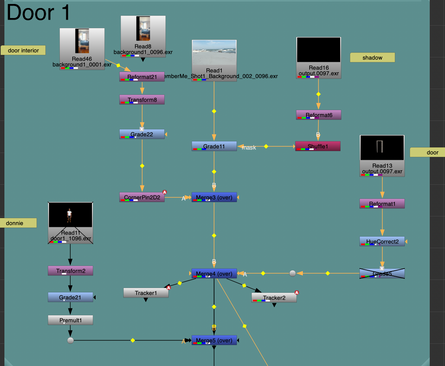
Node graph for the ground projection and final shot comp (That's the set up for all individual door shots. The circle shot is just a much longer version of this) .


October 26, 2022
Today I am rendering out shot 1. I decided to update the shaders for the door knob and door hinge. I just had a color on them before, so now they are more reflective. It's low on my priority list, but I may update the texture on the door to be less uniform. Probably just for the last door that you see close. (Shaders were updated further to blur out hot spot more. Door hinge was updated to include the 3 screws that go into the holes)

Comments