

Week 5
- dejamichele
- Oct 14, 2022
- 3 min read
Updated: Oct 18, 2022
Updates
Made HDRI's
Shot 3 lighting
Shot 3 clean up
Shot 3 model integration tests w/ Eugene
Shot 3 spark development
Week 6 Goals
Continue lighting shot 3
Composite of arm piece in plate
Continue working on sparks
Roto or alpha work where sparks fly near face
RnD on spark lights in environment
Clean up where arm moves as pen digs into skin
RnD on lights moving in black lines
So this past week included a lot of trial and error. I began by making the HDRI's for all the shots. I then moved into Maya with the HDRI for my shot (3). A problem I encountered was that the lights were not matching up exactly. The 2 shadows on the left seemed correct while the one on the right was off. I attempted to fix it with a spotlight, but that resulted in a double shadow that still wasn't in the correct spot. I decided to just light the scene with spotlights because it gave me more control of each lights intensity and color. However, I was having a hard time getting the shadows to be as wide as they were in the footage.

Right now I plan to still use the HDRI, but block out the light coming from the left so the shadow is gone and then create it with a spotlight. The top image is as close as I could get the shadows to match the reference. The bottom is the shadow when the light on the left is blocked.


Me and Eugene also worked together this weekend to figure out if the model fits in the scene and if any changes to it need to be made. We determined that the model will need to be scaled bigger overall but also length wise so that the pen is connecting to it whenever it goes down.
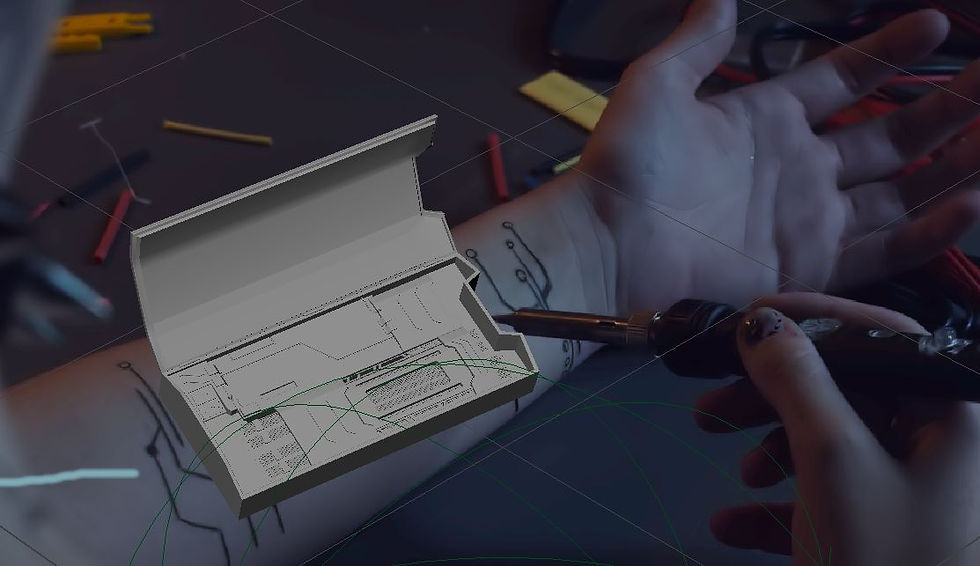
Moving on, I did a quick proxy model of the arm and extruded in where the model Eugene is modeling would go. I exported an .fbx and moved into Houdini. I imported it into the scene I had my sparks in and adjusted the scale and position of the parks and arm to match each other. I then rendered out a short sequence and moved into Nuke.


Using the same layout I showed in Week 4, I plugged in the new sequence and put it over the footage. I got rid of some of the motion blur and defocus so that it matched the plate better. I also regraded the sparks. Next I worked on getting an alpha for the right arm for when it crosses over the left. I used a grade node to get more contrast and then the min keyer to get the alpha. The most important part to have solid black for this is the middle of the arm. Hopefully the shadow information can be useful on the model, but if not it will be easy to get rid of. I then put it over a pink constant node to double check that the alpha was working good.


Next I used a roto node so that the pen was only being brought back in front of that middle region since the alpha outside of it isn't good or needed. So far the pen seems to look pretty good being merged over the sparks.


Finally, here is the latest version of the sparks. I still need to keyframe them to match the footage. I am trying to make them subtle since realistically they wouldn't be caused by this action. I think the motion could use some work and I will play around with the motion blur a little more. Maybe they need to come out more as well.
Here is one of my main references again:
Comments