

Week 7
- dejamichele
- Oct 26, 2022
- 2 min read
Updated: Nov 1, 2022
October 30th, 2022
There has been some trouble getting the updates arm piece rendered. I re-pathed all of the textures in the Maya file and the render did not look right. So I will be working Eugene to get that working.

I have also been working on getting lighting interaction from the sparks on the environment. I have not been getting great luck in that.
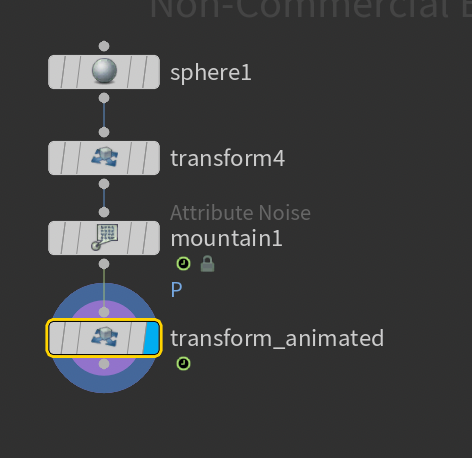
Here is what I have in Houdini:
I"m using a sphere as a light source. I have a mountain node with an animated element size. I also animated the sphere to get bigger and smaller as the pen moves in and out of the skin. I am trying to imitate the way the hot spot moves in my reference and get proper lighting information from it. I am thinking about using the shadow matte and inverting it to get the lighting.


I also tried the glow in Nuke and I didn't really like it. I feel it will be easier to get the resulting lighting for the environment by doing it in 3D.

October 26th, 2022
In preparation for tomorrows class / work day, I created a final version of the clean plate and made some alphas in Photoshop. I will use the clean plate to cover up the lines that overlap with the arm model. I plan to use the alphas for the glow and use the edge detect node to get the outer edges. I am thinking this will work better than relying on getting an alpha from the video. It messes up when the shadow of the pen passes over it. I also took out some of the arm art on the right arm. I felt it wasn't matching up that much with what was on the left and there was a lot there to make glow. I replaced it with something that matched the left pattern more.
Frame 155 and 240 (combined to make clean plate) Clean Plate and Alpha


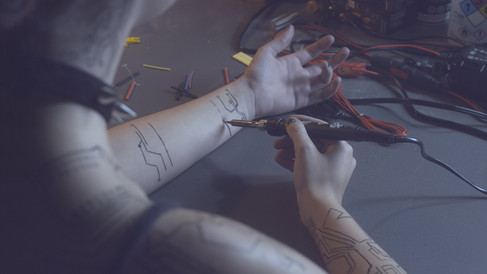


My plan for the shadow is to render out the alpha and then use it to bring it back over the clean plate. If that doesn't work then I have a lighting rig set up, so I can see what kind of shadow I get from there and animate it to match the footage. If that doesn't work, I have a lot of roto to do.
These alphas are from the old frame range, but I can adjust it to the point where it can be used to bring the shadow back. I also think there may be a way to use the alpha from Photoshop to help get rid of the line alpha in the shadow and maybe patch it up so it still looks smooth.


Comments